
Before you start #
Availability and permissions
- The website owner must perform financial and integration actions. HIVE’s PayPal platform access must be configured for the test.
Have these ready
- Use a separate PayPal sandbox business seller for testing. A buyer test account and HIVE’s platform account are not your store’s seller account.
Start in HIVE #
- Select your store, then open Store → Settings & connections. Confirm the correct website before continuing.
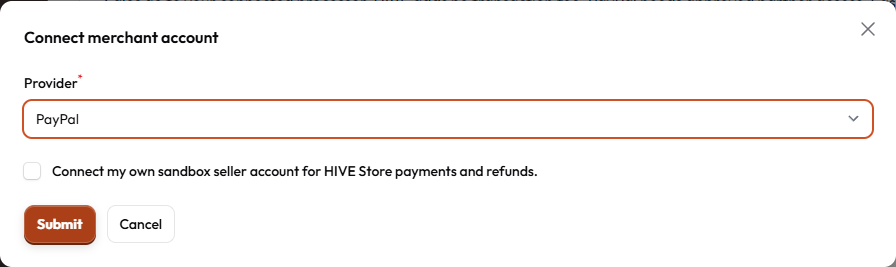
- Choose Connect merchant account. Select PayPal and review “Connect my own sandbox seller account for HIVE Store payments and refunds.”
- Agree only if you intend to connect that test seller, then continue to PayPal. If HIVE reports configuration unavailable, contact support; do not paste platform API secrets into another field.

Review PayPal’s permissions #
PayPal’s platform onboarding asks the seller to grant the platform permissions. HIVE’s current connection requests payment and refund capabilities. PayPal controls its own sign-in, account review and consent screens; wording may change.
- On PayPal’s sandbox site, sign in as the intended test seller. Review which account and permissions are displayed.
- Complete PayPal’s required seller steps and consent only if you approve. Do not use real card or bank details for a sandbox test.
- Return using PayPal’s return to HIVE action. Avoid reopening an old connection tab; connection attempts expire.
Check readiness in HIVE #
- Back in Settings & connections, find the PayPal card and confirm the environment is sandbox. Choose Check connection if a fresh status check is needed.
- A ready status means the current sandbox connection passed HIVE’s checks. An unconfirmed email, incomplete merchant setup or missing payment capability can leave it incomplete.
- Fix required seller information at PayPal, return and check again. If the attempt expired, begin a new connection from HIVE.
Disconnect or reconnect safely #
- Use Disconnect on the PayPal card to stop new payments through that connection. Review the confirmation. Existing financial history remains.
- To reconnect, start Connect merchant account again and approve the intended seller. A new connection does not erase previous orders.
- For an existing payment or refund problem, open the original order. Do not connect a different seller to try to move its payment history.
Sandbox is not live activation #
Current HIVE seller connection screens are sandbox-only. PayPal requires platform approval and live credentials before production use; a working test does not certify live selling. HIVE subscription billing is separate from money received by your store.
PayPal’s current onboarding and sandbox documentation is linked below. You should not have to provide HIVE’s platform client secret as a customer.
What success looks like #
The correct seller card shows sandbox and a verified ready state. No real sale or live-payment activation has occurred.
If something goes wrong #
- Wrong seller? Stop before consent or disconnect and start again with the correct sandbox seller.
- No return or expired attempt? Return to HIVE, check whether a card was saved, then begin a fresh connection if needed. Do not repeatedly approve old tabs.
- Not ready after consent? Check seller email and capability requirements. Share the visible status with support, never passwords, access tokens or API secrets.
Official provider information
To share a specific section, use the # link beside its heading and copy the address. To save or print this guide, use your browser’s Print command.